Account Linking
Account Linking is a unique Flow concept that allows sharing ownership over accounts. To understand how we can achieve that, we must first understand how to access accounts on Flow.
You can access accounts on flow in Cadence through two types, PublicAccount and Account. As the name implies, the PublicAccount type gives access to all public account information such as address, balance, storage capacity, etc., but doesn't allow changes to the account. The Account type (or more specifically, an [entitled]&Account) allows the same access as PublicAccount but also allows changes to the account, which includes adding or revoking account keys, managing the deployed contracts, as well as linking and publishing Capabilities.
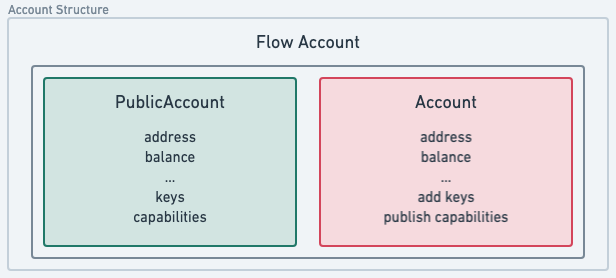
Access Account
When you access Account, you can modify account storage, so it's essential to mandate that the account being accessed signs all transactions, which safeguards this access. Account entitlements allow for more granular access control over the specific parts of the account that you can access from within the signed transaction. A transaction can list multiple authorizing account it wants to access as part of the prepare section of the transaction. Read more about transaction signing in the [transaction documentation].
Since access to the Account object allows state change, the idea of account ownership actually translates to the ability to access the underlying account. Traditionally, you might consider this the same as having key access on an account, but we'll see in just a minute how programmatic, ownership-level access is unlocked with Cadence Capabilities
Account Capabilities
Before you continue with this section, you'll need a clear understanding of Cadence Capabilities. Advanced features such as Account Capabilities are powerful, but they can put your app or users at risk if used incorrectly.
Cadence allows for Capabilities creation to delegate access to account storage, which means any account that obtains a valid Ccapability to another account object in the storage can access it. This is a powerful feature on its own - to access another account programmatically without the need for an active key on the accessible account. You can limit the access to the object when you create a Capability so your users can only access intended functions or fields.
Account Linking is made possible by the extension of Capabilities on the Account object itself. Similar to how storage capabilities allow access to a value stored in an account's storage, &Account Capabilities allow delegated access to the issuing Account. These Capabilities allow for access to key assignment, contract deployment, and other privileged actions on the delegating Account - which effectively shares account ownership without the need to add or share a key. The delegating account can revoke this Capability at any time.
Create Account Links
When we refer to 'Account Linking,' we mean that the parent account creates an &Account Capability and published to another account. The account that owns the &Account Capability which was made available to another account is the child account. The account in possession of the Capability given by the child account becomes its parent account.
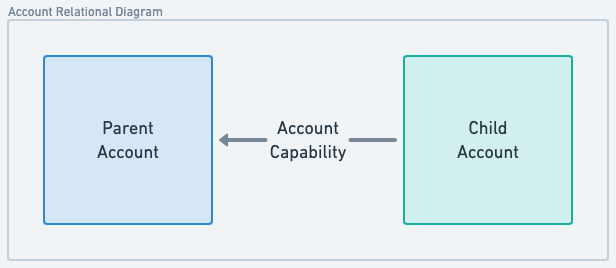
You can create a link between two current accounts on Flow in two steps:
- A child account creates an
&AccountCapability and publishes it to the parent account. - The parent account, claims that Capability and can access the child's account through it.
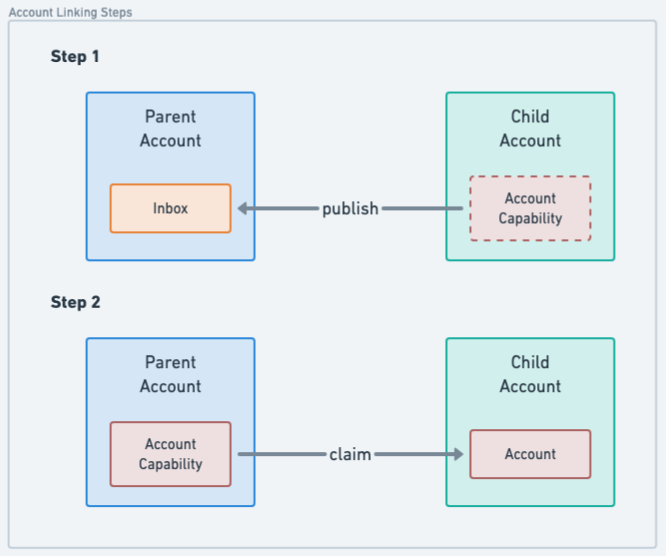
These two steps are implemented in Cadence as two transactions:
********************Create capability************************
The account B creates and publishes the &Account Capability to the account A at the address 0x01
_12#allowAccountLinking_12_12transaction {_12 prepare(signer: auth(IssueAccountCapabilityController, PublishInboxCapability) &Account) {_12 // Issue a fully-entitled account capability_12 let capability = signer.capabilities_12 .account_12 .issue<auth(Storage, Contracts, Keys, Inbox, Capabilities) &Account>()_12 // Publish the capability for the specified recipient_12 signer.inbox.publish(capability, name: "accountCapA", recipient: 0x1)_12 }_12}
********************Claim capability********************
The account A claims the Capability published by account B.
_18transaction {_18 prepare(signer: auth(ClaimInboxCapability) &Account) {_18 let capabilityName = "accountCapB"_18 let providerAddress = 0x2_18 // Claim the capability published by the account 0x2_18 let capability = signer.inbox_18 .claim<auth(Storage, Contracts, Keys, Inbox, Capabilities) &Account>(_18 capabilityName,_18 provider: providerAddress_18 ) ?? panic(_18 "Capability with name ".concat(capabilityName)_18 .concat(" from provider ").concat(providerAddress.toString())_18 .concat(" not found")_18 )_18 // Simply borrowing an Account reference here for demonstration purposes_18 let accountRef = capability.borrow()!_18 }_18}
What is Account Linking most useful for?
Account Linking was specifically designed to allow smooth and seamless custodial onboarding of users to your Flow-based application without the requirement of a wallet to do so. This pattern overcomes both the technical hurdle, as well as user's reluctance to install a wallet, which opens access to Flow applications to every user. Users can experience an app without any delay and still offer a path to self-sovreign ownership.
Naturally, users may expect to use their account with another application, or otherwise move assets stored in that account elsewhere - at minimum from their wallet. When an app initially leverages Account Linking, the app creates the account instead of the user and stores that user's specific state in the app-created account. At a later point, users can take ownership of the app account if they possess a full [Flow account], which they can get if they install a wallet app.
Account Linking allows users to possess multiple linked child accounts from different apps. Access complexities associated with those child accounts are eliminated if you abstract access to them through the user's parent account.
Simply put, child accounts are accessed and can be treated as a seamless part of the parent account.
All assets in the app account can now jump the walled garden to play in the rest of the Flow ecosystem. The user does not need to rely on the custodial app to execute transactions moving assets from the child account as the parent account already has access to the assets in the child account.
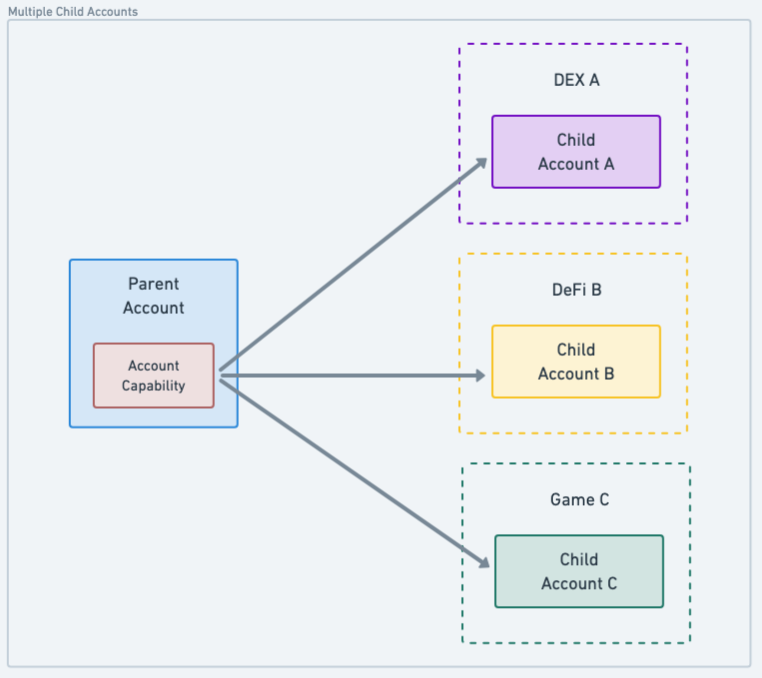
This shared control over the digital items in the in-app account allows users to establish real ownership of the items beyond the context of the app, where they can use their parent account to view inventory, take the items to other apps in the ecosystem, such as a marketplace or a game.
Most importantly, users can do this without the need to transfer the digital items between accounts, which makes it seamless to continue to use the original app and enjoy their assets in other contexts.
Security considerations
Account Linking is a very powerful Cadence feature, and thus you must treat it with care. So far in this document, we've discussed Account Linking between two accounts we own, even if a third-party application manages the child account. But, we can't make the same trust assumptions about custodial accounts in the real world.
If we create an &Account Capability and publish it to an account we don't own, we give that account full access to our account. This should be seen as an anti-pattern.
If you create an &Account Capability and share it with a third-party account, you effectively give that person your account's private keys.
Because unfiltered account linking can be dangerous, Flow introduces the HybridCustody contract that helps custodial applications regulate access and allows parent accounts to manage their many child accounts and assets within them.
Learn more about it in the [Working With Parent Accounts] documentation.
Hybrid custody and Account Linking
Apps need assurances that their own resources are safe from malicious actors, so to permit full access might not be what they want. Hybrid custody contracts will allow the app to maintain control of their managed accounts, but they can:
- Share capabilities freely, with a few built-in controls over the types of capabilities that can be retrieved by
parent accounts via helper contracts (the
CapabilityFactory, andCapabilityFilter). - Share additional capabilities (public or private) with a parent account via a
CapabilityDelegatorresource.
Guides
- Building Walletless Applications Using Child Accounts covers how apps can leverage Account Linking to create a seamless user experience and allow future self-custody.
- [Working With Parent Accounts] covers features activated by the core
HybridCustodycontract to access child account assets from parent accounts. This is useful for apps like marketplaces or wallets that work with accounts that have potential child accounts.
Resources
- [Forum Post] where core concepts were introduced and discussed.
- [GitHub repository] where
HybridCustodycore contracts and scripts are maintained. Check out the repository for more advanced script or transaction examples. - [Example] - Account Linking project with [Magic].
- [Starter template] for [Niftory] Account Linking API.
[entitled]: https://cadence-lang.org/docs/language/access-control#entitlements) [Flow account]: ../../../build/cadence/basics/accounts.md [Forum Post]: https://forum.flow.com/t/hybrid-custody/4016 [GitHub repository]: https://github.com/onflow/hybrid-custody [Example]: https://github.com/jribbink/magic-link-hc-sample/ [Magic]: https://magic.link/ [Starter template]: https://github.com/Niftory/niftory-samples/tree/main/walletless-onboarding [Niftory]: https://niftory.com/ [transaction documentation]: ../../../build/cadence/basics/transactions.md [Working With Parent Accounts]: ./parent-accounts.md